

How do I optimize the performance of a Wifi Router with UPS?
Leave a message

In today's digital age, a stable and high - performance Wi - Fi connection is crucial for both personal and business use. A Wi - Fi router with an Uninterruptible Power Supply (UPS) can significantly enhance the reliability and performance of your network. As a supplier of Wi - Fi routers with UPS, I have gained extensive experience in optimizing their performance. In this blog, I will share some effective strategies to achieve this goal.
Understanding the Basics of Wi - Fi Router with UPS
Before delving into optimization techniques, it's essential to understand the fundamental components and functions of a Wi - Fi router with UPS. A Wi - Fi router is responsible for creating a wireless network, allowing multiple devices to connect and access the internet. The UPS, on the other hand, provides backup power in case of a power outage, ensuring that the router continues to operate without interruption.
The combination of a Wi - Fi router and UPS offers several benefits. Firstly, it guarantees continuous internet access during power outages, which is particularly important for businesses that rely on online services. Secondly, it protects the router from power surges and fluctuations, extending its lifespan. Lastly, it provides a stable power source, which can improve the overall performance of the router.
Optimizing the UPS for Wi - Fi Router
Selecting the Right UPS
The first step in optimizing the performance of a Wi - Fi router with UPS is to choose the right UPS for your router. Different routers have different power requirements, so it's crucial to select a UPS that can provide sufficient power. For example, if your router has a high - power consumption, you may need a UPS with a higher capacity.

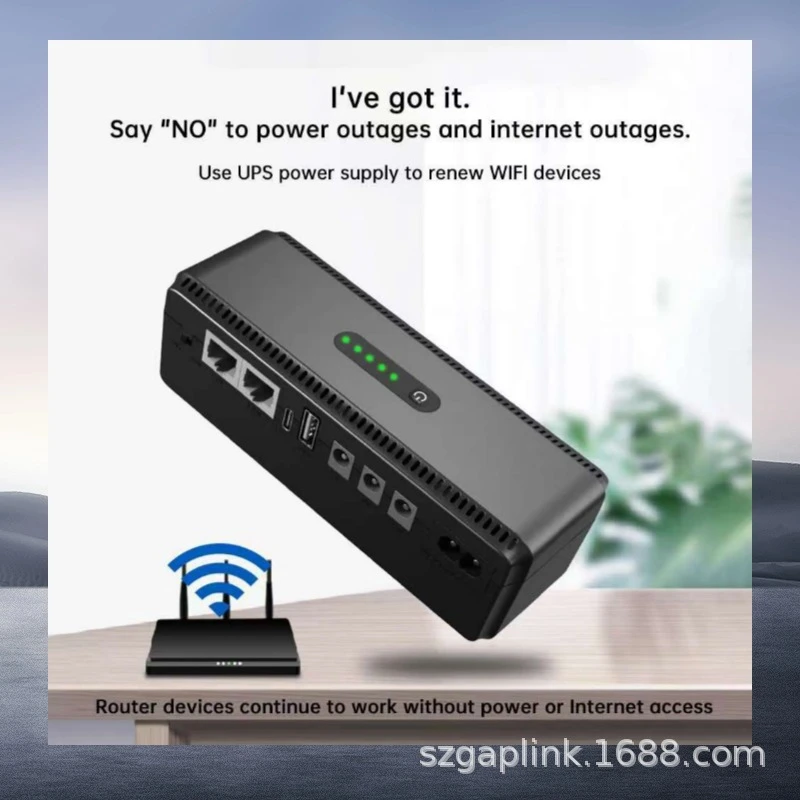
We offer a variety of UPS options, such as the Portable DC UPS with 10400mAh, which is suitable for small - to - medium - sized routers. This portable UPS provides a reliable power source and can keep your router running for a certain period during a power outage.
Proper Installation and Placement
Proper installation and placement of the UPS are also important for optimizing performance. The UPS should be installed in a well - ventilated area to prevent overheating. It should also be placed close to the router to minimize the length of the power cable, which can reduce power loss.
Make sure the UPS is connected to a stable power source. Avoid connecting the UPS to a power strip that is already overloaded, as this can cause power issues.
Regular Maintenance
Regular maintenance of the UPS is essential to ensure its optimal performance. This includes checking the battery regularly, cleaning the UPS, and updating the firmware.
The battery is the most critical component of the UPS. Over time, the battery's capacity may decrease, which can affect the UPS's ability to provide backup power. It's recommended to test the battery regularly and replace it if necessary.
Optimizing the Wi - Fi Router
Firmware Updates
One of the most effective ways to optimize the performance of a Wi - Fi router is to keep its firmware up - to - date. Router manufacturers often release firmware updates to fix bugs, improve security, and enhance performance.
To update the firmware, you can usually access the router's administration page through a web browser. Look for the firmware update option and follow the instructions provided by the manufacturer.
Channel Selection
Wi - Fi routers operate on different channels, and interference from other devices on the same channel can degrade the performance of your network. To optimize the performance, you can manually select a less congested channel.
Most routers have a built - in channel scanner that can help you identify the least congested channels. You can access this feature through the router's administration page and select the appropriate channel.
Antenna Placement
The placement of the router's antennas can also have a significant impact on the performance of the Wi - Fi network. Antennas should be positioned vertically for maximum coverage. If your router has multiple antennas, you can experiment with different orientations to find the best configuration.
Integrating UPS and Wi - Fi Router for Optimal Performance
Power Management
Proper power management is crucial for integrating the UPS and Wi - Fi router. The UPS should be configured to provide the right amount of power to the router. Some UPS models allow you to adjust the power output, which can help optimize the performance of the router.
We offer Wifi Router Backup UPS and Wifi Router UPS 9v that are specifically designed to work with Wi - Fi routers. These UPS models provide stable power and can be easily integrated with your router.
Monitoring and Troubleshooting
Monitoring the performance of the UPS and Wi - Fi router is essential for early detection of problems. You can use the router's administration page to monitor the network status, such as signal strength, connection speed, and device connectivity.
If you encounter any issues, such as slow internet speed or frequent disconnections, you can troubleshoot the problem by checking the UPS, router settings, and network cables. In some cases, you may need to contact technical support for further assistance.
Conclusion
Optimizing the performance of a Wi - Fi router with UPS requires a combination of proper selection, installation, maintenance, and integration. By following the strategies outlined in this blog, you can ensure that your Wi - Fi network remains stable and reliable, even during power outages.
If you are interested in purchasing a Wi - Fi router with UPS or have any questions about optimizing their performance, please feel free to contact us. We are committed to providing high - quality products and excellent customer service.
References
- Wi - Fi Router User Manuals
- UPS Manufacturer Documentation
- Industry Reports on Wi - Fi and UPS Technologies


